Van Furniture in Freeform: Sloped Walls, Round Corners, Wheel Wells
Reading time: approx. 7 minutes
A van is not a box. The side wall leans inward as it rises, the wheel well sticks into the room, and behind the swivel seat the backrest needs space. Yet almost everyone plans with rectangles – because most planners know nothing else.
VanLogic has Freeform for exactly this. You draw the real outline of your piece of furniture, and the app calculates with exactly that shape: weight, axle load, centre of gravity and collisions. No stacking blocks, no kilo you have to guess at the end.
Using five typical pieces of van furniture, we show what this looks like in the app – and what it changes in the weight.
How much a complete conversion weighs, we worked out part by part in How Much Does a Van Conversion Weigh?
All the tools for van furniture on one page – Freeform, eight build methods, cutouts, collision check and 3D: Building furniture with VanLogic.
How to draw a Freeform
In the object editor, tap “Freeform” under the shape and then “Edit outline”. “Draw freeform” opens:
- Pick a starting shape: Rectangle, L-Shape, Trapezoid, Chamfered corner, U-shape or Hexagon.
- Adjust the shape: drag points – or tap an edge and move it in parallel with the double arrow.
- Type the dimensions: the list “Edge 1 …” shows every edge length. You type the length, the angles stay.
- “Done” – the shape is in your plan.
With “Grid & right angles”, points snap to a 10 mm grid and to right angles. Below the drawing you see area, dimensions and weight – recalculated with every drag.
Example: cabinet behind the swivel seat
With a swivel base, the driver’s seat turns towards the living area. Behind the backrest it needs room for that, roughly 25 to 35 cm. A tall cabinet right behind it therefore gets an angled corner towards the aisle.
In VanLogic: Freeform 50 × 70 cm, 150 cm tall, starting shape “Rectangle”. Add a point at the front and drag the corner at the aisle back by 25 cm – the app shows 135° at both ends of the slope.
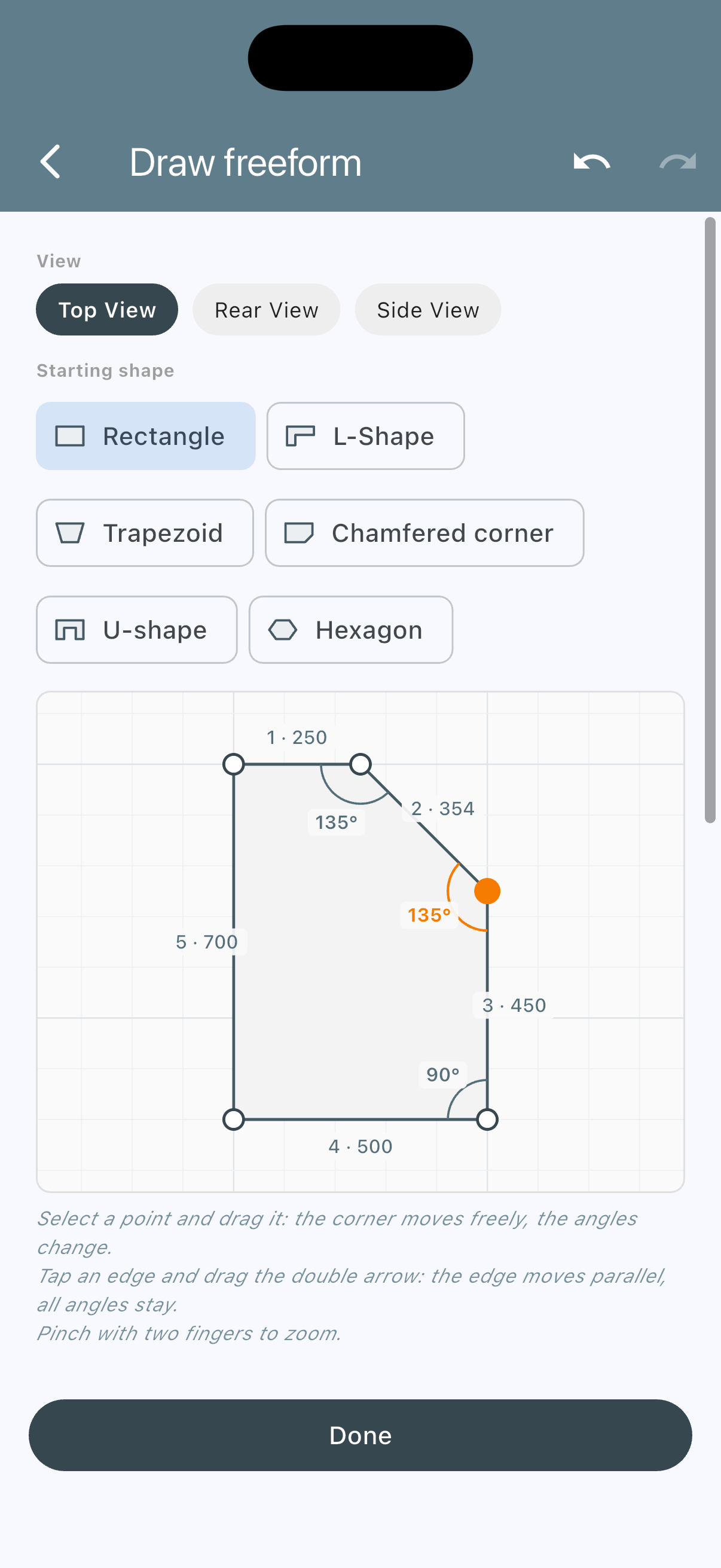
“Draw freeform”: the slope towards the aisle, 135° at both ends.
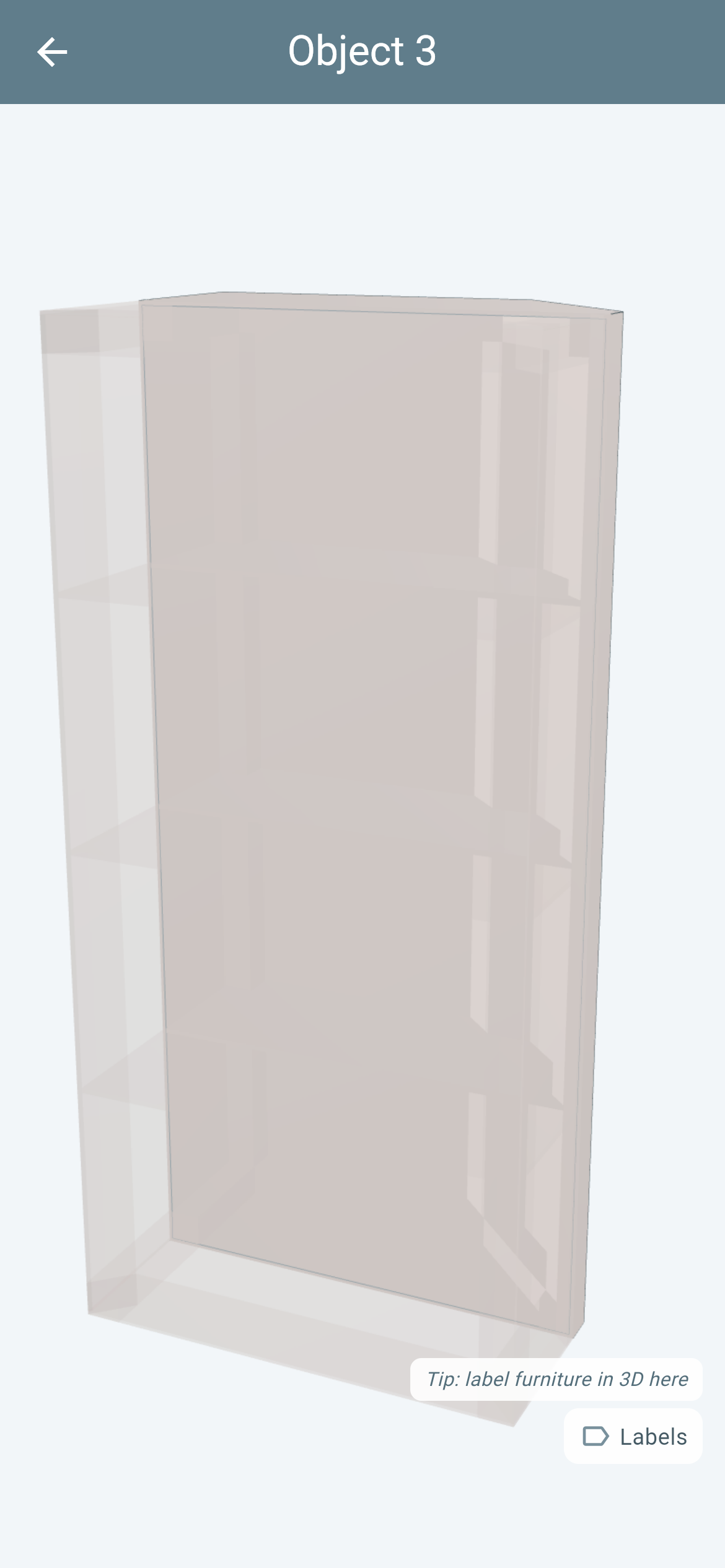
The same cabinet in the 3D build view – Frame + Panelling with three shelves.
The slope frees 177 mm at the corner for the backrest. Because the weight comes from the outline, the base, the top and the three shelves are 9% smaller in the calculation (0.350 → 0.319 m²) – exactly as you cut them. Planned as a rectangle, this material would sit in the weight although it is never built in. In return, the cabinet gets a fifth corner post at the slope, and VanLogic counts that too – so overall it weighs almost exactly as much as the rectangle. Just as you build it.
The full guide is in the help under Furniture 16: Cabinet behind the swivel seat.
Sloped wall: lean per edge
Hold a ruler vertically against the side wall of your panel van: a gap opens at the top, and it gets bigger the higher you measure. A wall cabinet planned as a rectangle hits the wall there – or you move it away from the wall and waste space.
That is why every edge in “Draw freeform” has a “Lean” field:
- Plus angle: the wall leans inward at the top – like the bodywork.
- Minus angle: the wall leans outward at the top and is set back at the bottom – for example a seat box with room for your heels.
Below it you see how far the top edge moves (“top 85 mm inward”). The oblique view below the drawing shows the whole body, leaning walls in orange.
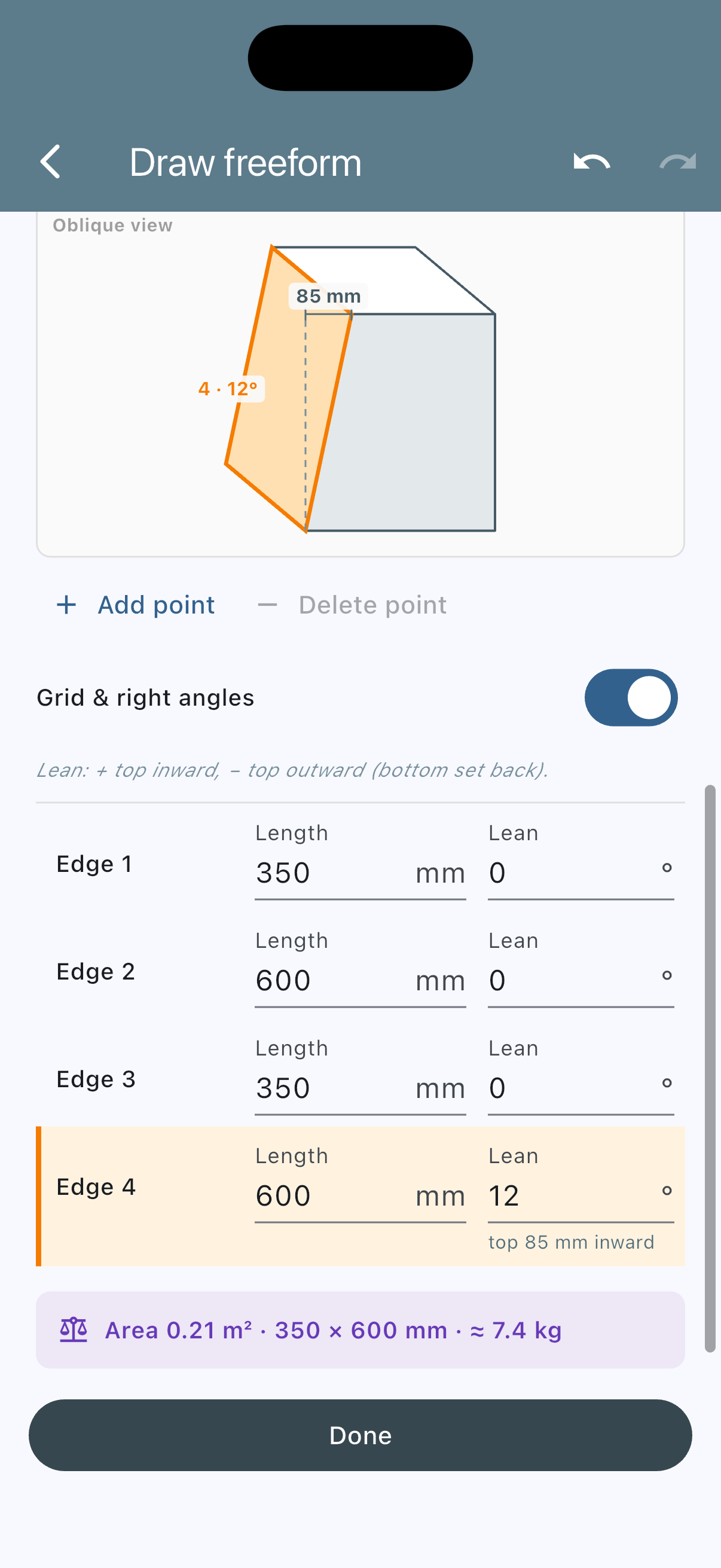
Wall cabinet with 12° lean on the wall side: “top 85 mm inward”, the leaning wall in orange in the oblique view.
What it changes in the weight
A wall cabinet 35 × 60 cm, 40 cm tall, as a Closed Box made of 15 mm poplar plywood. The side facing the vehicle wall gets 12° of lean. At the top it moves 400 mm × tan(12°) = 85 mm inward.
| As a rectangle | With 12° lean | |
|---|---|---|
| Top | 0.210 m² | 0.159 m² (−24%) |
| Total panel area | 1.180 m² | 1.100 m² |
| Weight | 7.97 kg | 7.43 kg |
A good half kilo less – that is not the point. The point is: the rectangle would have stuck 85 mm into the wall at the top. With the lean, the cabinet fits, and the weight is still right.
Checked by hand: base 0.210 + top 0.159 + leaning wall 0.245 + straight wall 0.240 + two trapezoid sides 0.246 = 1.100 m². Times 6.75 kg/m² (poplar plywood 450 kg/m³ × 15 mm) gives 7.43 kg – the same value VanLogic shows.
Even faster: “Lean wall” from the collision warning
If a cabinet sticks into the roof taper, VanLogic reports a collision. Tap the warning, and next to “Add/edit cutout” the dialog shows the “Lean wall” button – with a concrete suggestion: which edge, how many degrees, how far the top edge moves inward. VanLogic looks for the smallest angle at which the cabinet fits under the slope.
One tap opens “Draw freeform” with exactly that angle. Nothing is applied until “Done”. This also works for a rectangle or an L-shape – it becomes a Freeform with the same outline.
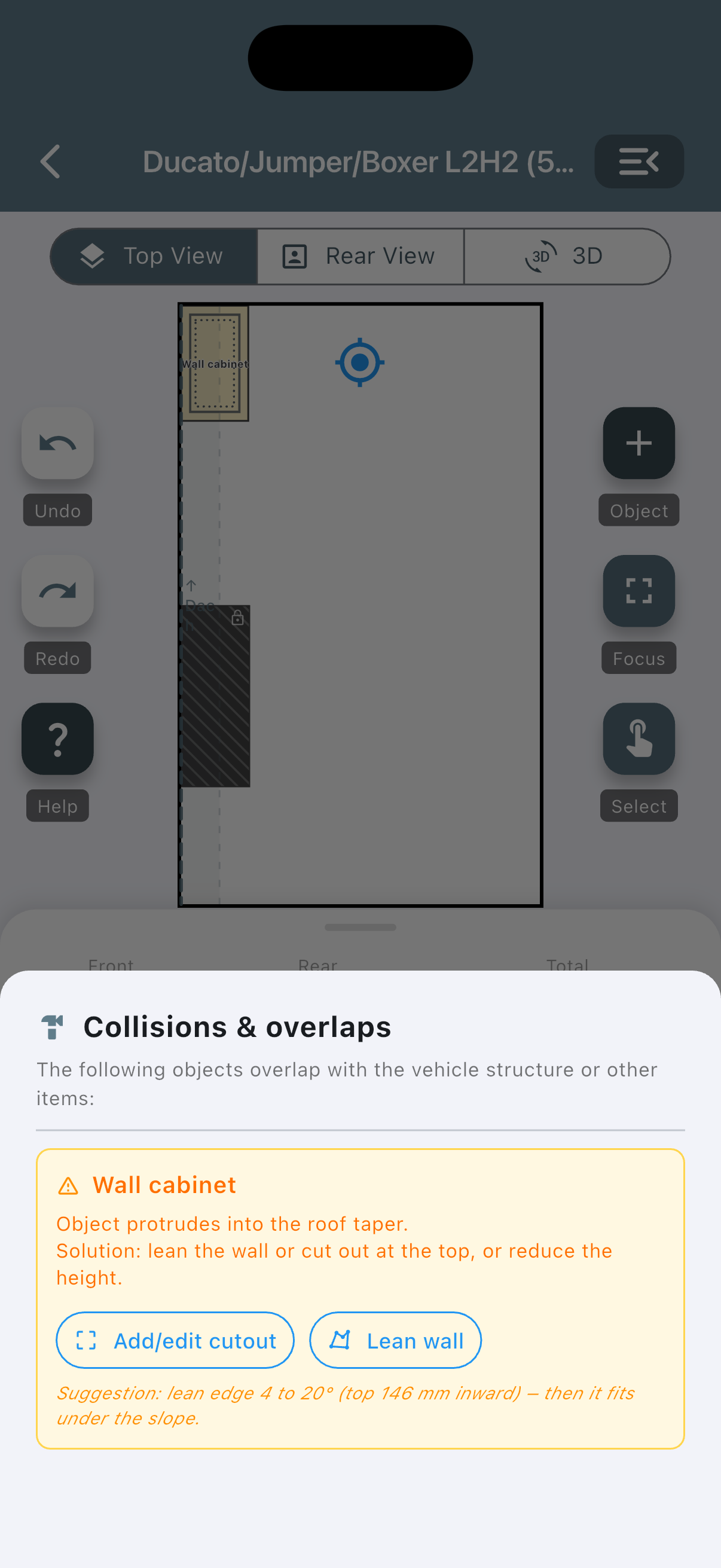
Collision with the roof taper: VanLogic suggests leaning the wall – with edge, angle and offset.
Round corner: radius per corner
Where you walk past every day, you don’t want a sharp edge. Between bench and kitchen block a 45 cm passage is enough, between two tall cabinets 50 cm is the minimum – more on that in the camper floor plan guide. Right at the narrow spot there is usually a corner.
In “Draw freeform” you tap the corner point. Below it, for example, “Corner 2” appears with the “Radius” field. The largest possible value is shown right underneath; 0 makes the corner sharp again.
Example: a worktop 120 × 60 cm made of 18 mm birch plywood, the corner towards the aisle with a 150 mm radius.
| Sharp corner | Radius 150 mm | |
|---|---|---|
| Area | 0.720 m² | 0.715 m² |
| Weight | 9.07 kg | 9.01 kg |
| Clearance at the corner (diagonal) | – | 62 mm |
The rounding costs about 60 grams of board and frees 62 mm exactly where you would otherwise bump into it. For cutting, VanLogic writes the arc straight into the material list: “Cut to outline | 1 × arc r = 150 mm”.
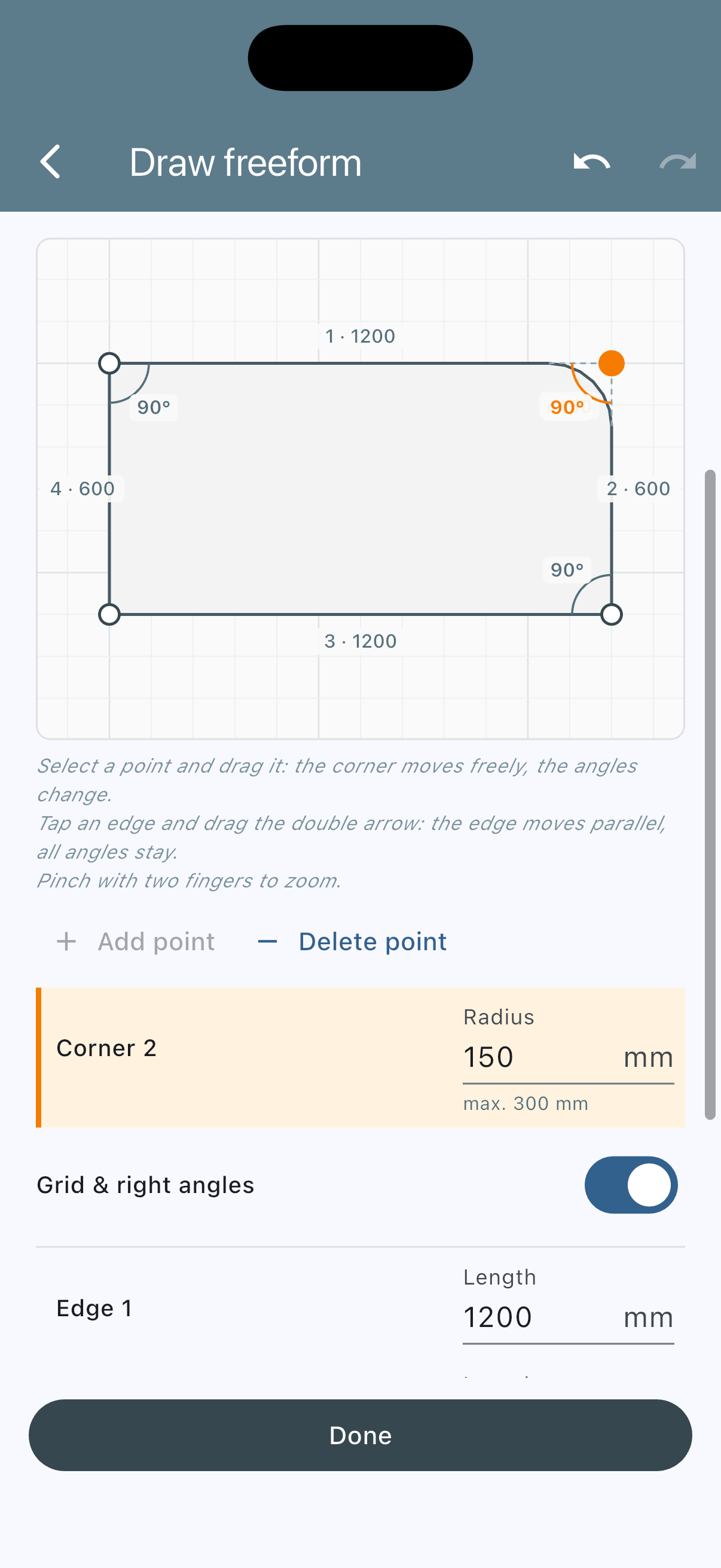
Tap the corner point, enter the radius – “max. …” shows the limit.
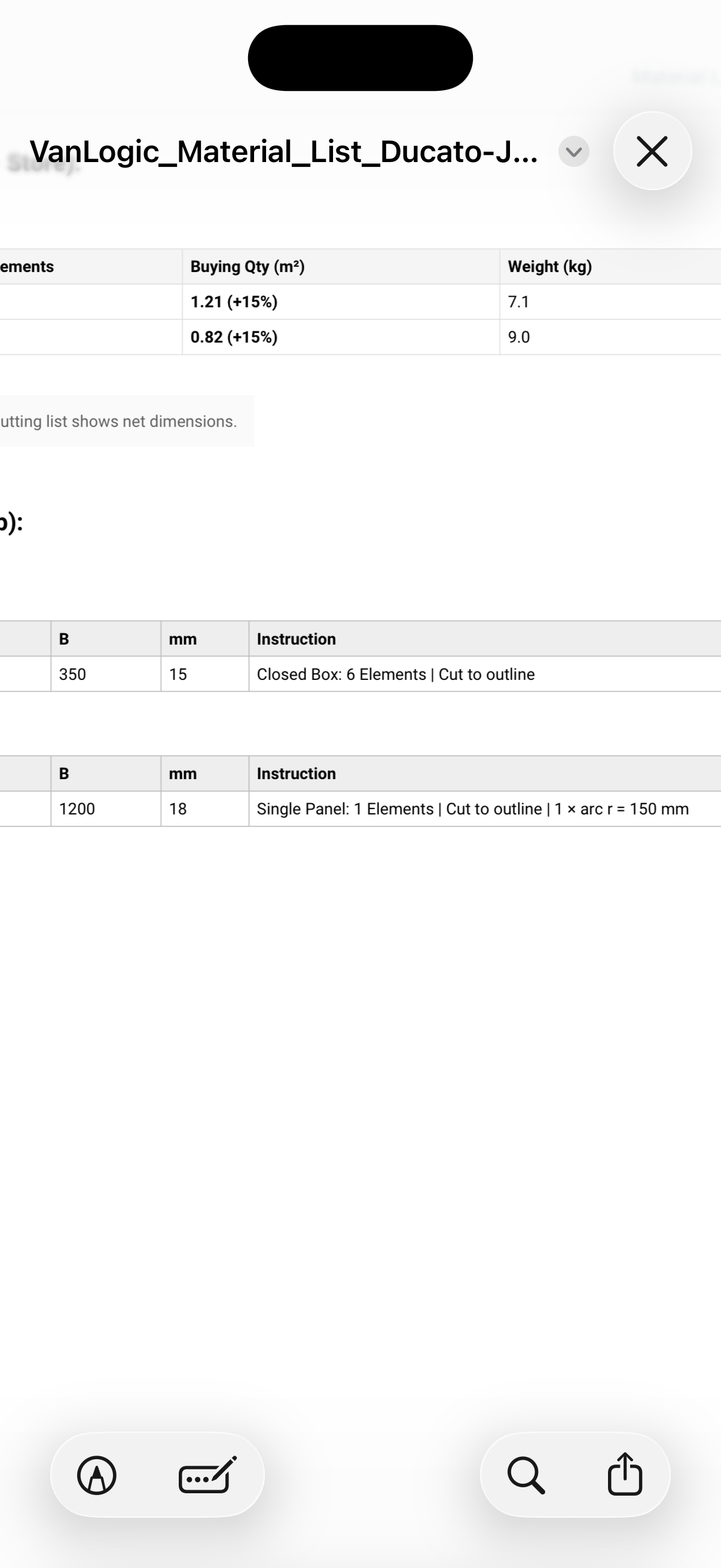
The material list shows the arc for cutting right away.
Wheel well: cutout or outline around it
The wheel well is the reason so much van furniture is shorter than it needs to be. VanLogic offers two ways, and in both the collision check uses the real outline – not the rectangle around it.
The furniture goes over the wheel well. If you simply place it on top, VanLogic reports the collision. In the dialog, “Add/edit cutout” fills in position and dimensions from the overlap. The screen shows which material is removed (“Removes: bottom panel, …”) and how many kilos that saves (“Saves … with this cutout”). Once the wheel well is clear, the warning disappears by itself.
The furniture ends next to the wheel well. Then you draw the outline with a notch around it, even at an angle along the wall. If the wheel well lies outside the outline, there is no warning.
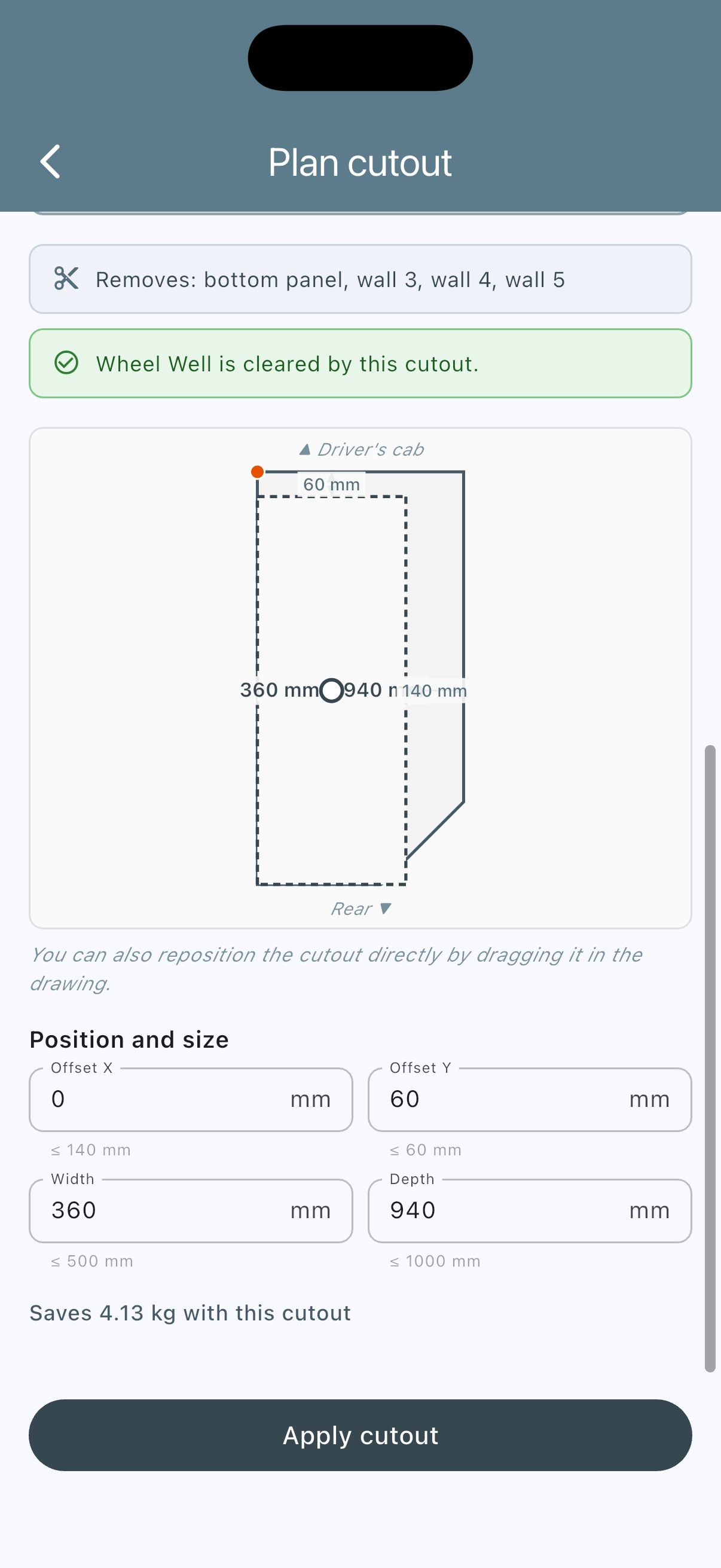
Cutout for the wheel well, pre-filled from the collision warning: VanLogic shows which material is removed and how many kilos that saves.
Instead of deducting a flat “ten percent for the wheel well”, VanLogic removes exactly the material the cutout hits – for a Closed Box the base and the affected walls up to wheel-well height.
Shape from behind or from the side
Some furniture is easier to describe from the side than from above – a bench with a sloping backrest or a platform with a step. For that, choose “Rear View” or “Side View” under “View” in “Draw freeform”, draw the shape and enter the depth. Weight, 3D and collisions work with the drawn shape here too.
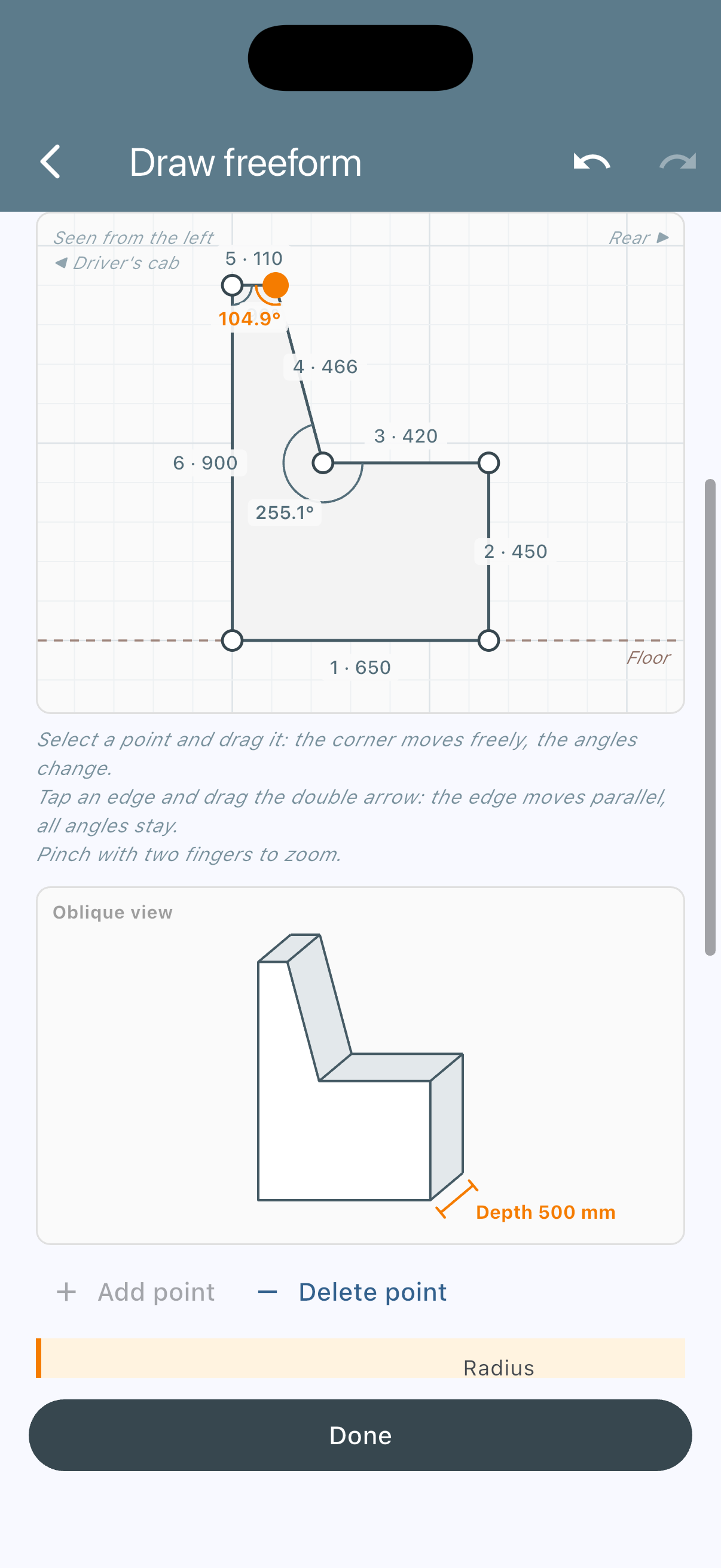
Bench with a sloping backrest, drawn in the side view.
What VanLogic makes of your outline
A drawn shape helps you picture it. VanLogic turns it into numbers:
- Weight – base, top and shelves from the area of the outline, the walls from every single edge, leaning ones with their sloped length. With Frame + Panelling there is a post at every corner. That applies to every build method – which one suits what is covered in Camper Van Furniture: Build Methods Compared.
- Centre of gravity and axle load – from the centre of the real shape. An L-shaped kitchen block has its centre of gravity where the material is, not in the middle of the rectangle around it. What that means for axle load and handling is covered in separate articles.
- Collisions – against wheel well, roof taper and other furniture: on the real footprint, and with leaning walls on the real body.
- Fronts – drawers and doors on every straight, vertical edge.
- Plan, rear view, 3D and PDF show the shape, the material list gives the cut to outline.
For comparison: in VanSpace 3D you can build freely from basic shapes such as cube, cylinder or plane – but without any link to material or weight. How the common planners differ is covered in the comparison of camper van conversion planners.
To be honest: for a single piece of furniture we are talking about grams up to a few hundred grams. What matters more is that the furniture fits the wall you drew it against – and that the number you plan your payload with is right.
Conclusion
Van walls are sloped, corners stick into the aisle, and wheel wells don’t disappear because you ignore them in the plan. With Freeform you draw the shape you actually build in VanLogic – with lean, radius and cutout – and the app calculates weight, axle load and collisions with exactly that shape.
Two questions are worth asking for every piece of furniture: does it stand against a wall that leans in? And does someone walk past it? Two yeses mean: the rectangle is the wrong shape.
You can try all features for free in the test environment.
→ Plan your conversion with Freeform — vanlogic.app
Sources and assumptions
- Space behind the swivel seat 25–35 cm – The Van Smith: “about 10 to 14 inches of clear space behind the seatback” for a 180° turn (Van Seats Swivel, Slide & Sleep Guide).
- Material densities – poplar plywood 450 kg/m³, birch plywood 700 kg/m³ from our material table, checked there against manufacturer data sheets. This gives 6.75 kg/m² for 15 mm poplar and 12.6 kg/m² for 18 mm birch.
- Passage widths 45 / 50 cm from the floor plan guide.
- 12° wall lean – example value, not vehicle data. How much your wall leans in is best measured yourself, with a plumb line and a folding rule.
- Areas and weights in the tables are calculated by hand (area × board thickness × density) and match what the app shows. VanLogic calculates the arc as a polygon of 15° segments. It therefore removes 2 cm² more than an exact quarter circle – about 2.5 grams on this worktop.
About VanLogic: VanLogic is a planning app for camper van self-builders, made by a team that converts vans themselves. Every piece of furniture gets a shape, dimensions, material and build method — the weight is calculated automatically, never estimated manually. Available for iOS and Android — and testable directly in your browser.